


HotStock - in-stock alerts
3.44.03K Reviews
App Specs
- Version
- 1.0.184
- Updated On
- License
- Free
- Downloads
- 500,000+
- Developer
- Litebox
- Categories
- Shopping
- Platform
- Android, iOS
Screenshots
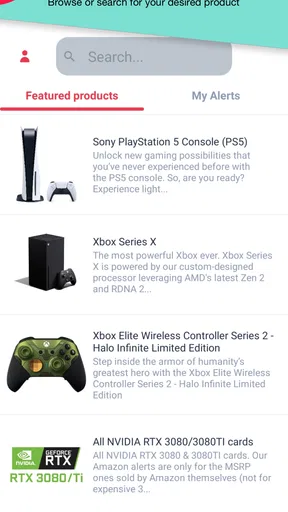
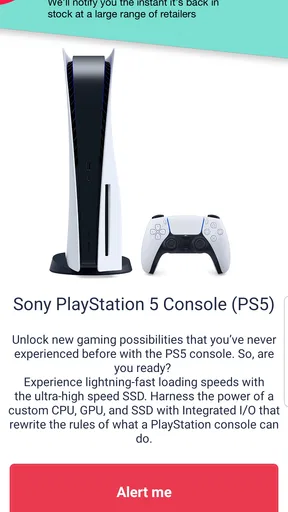

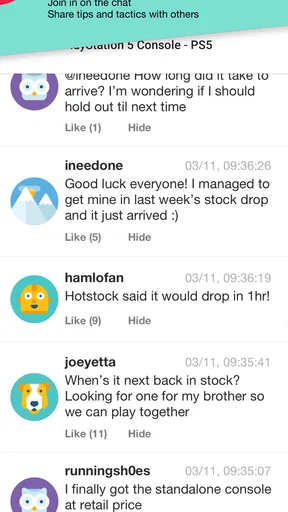
 Analysis by AppCompare
I judge a stock-alert app by a simple question: does it make a rushed buying decision easier, or does it just give me another notification to manage? HotStock is aimed at people who already know what they want and are tired of repeatedly checking product pages. That distinction matters. It is less useful for casual browsing than for keeping an eye on a particular item whose availability changes quickly.
Who gets the most value from an alert
I’d consider this kind of tool when missing the next restock would mean waiting again, especially if I’m tracking a specific model rather than shopping for something interchangeable. A console, a particular appliance, or a sought-after clothing item can all make sense as targets, provided I’m ready to act when an alert arrives. If I’m still deciding whether I want the product, a notification may create pressure without solving the real problem.
A useful habit is to settle the important buying details before setting an alert: which version I want, what price I’m comfortable paying, and whether I’d accept a substitute. That small bit of preparation can keep a sudden availability message from turning into an impulsive purchase. I’d also treat an alert as a prompt to check the offer, not as a guarantee that the product will still be available by the time I reach checkout.
How it fits into a shopping routine
Imagine I’m replacing a kitchen appliance but want one particular model. Instead of opening the same retailer page throughout the day, I can use an alert-focused app to watch for a change and keep doing other things. When a notification arrives, I still need to check the product details, delivery terms, and final price before buying. The time saved is in reducing repetitive checking, not in removing the decisions that make a purchase worthwhile.
That distinction is especially helpful for anyone who shops between work, errands, and family commitments. Alerts can bring a change in availability to my attention when I’m away from a browser, but they can also arrive at inconvenient moments. I would only turn them on for products I genuinely intend to buy; tracking a long list of vague possibilities risks making the phone noisier without improving my chances.
What to check before relying on it
Notifications are only valuable if they are timely enough for the product I’m watching and lead me to an offer I’m willing to buy. I’d test the routine with one priority item first, then decide whether adding more alerts is helpful. If a product has several versions, I’d be careful to track the exact one I want wherever the app lets me do so; otherwise, a message about a similar but unsuitable option can waste the moment.
It also pays to decide in advance what counts as a worthwhile offer. A restock alone does not tell me whether the price, seller, or purchase conditions suit me. I would compare the checkout total with my own budget and use the retailer’s product page to confirm the variant before committing. That extra check is not a flaw unique to this app; it is sensible shopping whenever availability is scarce and time feels limited.
Worth Reading Before You Choose

EA SPORTS FC Mobile 26 Is a Bigger Football Game, but It Takes Time

Flipboard Shows What News Apps Must Do Beyond the Feed

Switching to Android Auto Means Rethinking Your Driving Routine

Google Calendar Makes a Crowded Week Easier to Manage

Ludo King Makes the Most of the Minutes Between Plans

Baby Panda World Brings Quick Play to Modern Phones, but Its Game Library Feels Busy
There is a trade-off between convenience and attention. A targeted alert can replace repeated manual checking, while too many notifications can become easy to ignore. For that reason, I’d keep the watch list focused and remove items once I’ve bought them or changed my mind. This is a more useful workflow than treating a stock tracker as a general-purpose shopping feed.
First Impressions
The moment I installed HotStock, I was struck by its clean, intuitive interface. You know that feeling when you enter a store, and everything is neatly organized? That’s exactly what you get here. It’s like your own personal shopping assistant that’s always on the ball. Setting up alerts for products is a breeze, and within minutes, I had my wish list ready to go.
Features That Stand Out
What sets HotStock apart from the competition is its real-time stock alerts. No more missing out on limited releases or waiting for Black Friday deals only to find everything sold out. Here’s where it gets interesting. The app sends notifications faster than most competitors, so you get the jump on other shoppers. I tested this by setting an alert for a high-demand gaming console, and sure enough, my phone buzzed the moment it was back in stock.
Now, let's talk about the customizable options. You can tailor alerts based on store location or even specific variants of a product. Fancy a particular color or model? HotStock has got you covered. It’s all about making sure you get exactly what you want without breaking a sweat.
User Experience
Using HotStock is like having a shopping concierge at your fingertips. The app runs smoothly without any hiccups, and the navigation is a piece of cake. I appreciated the straightforward tabs and how easy it was to toggle between settings and alerts. Even if you're not tech-savvy, you’ll find this app a piece of cake to use.
One nifty feature is the price comparison tool. Not only does it alert you when items are back in stock, but it also shows you where you can score the best deal. I managed to save a few bucks on a kitchen appliance I’d been eyeing for ages. Who doesn’t love a bargain?
Choosing it over other ways to shop
HotStock is a free shopping app from Litebox, and its focus on availability gives it a different role from a retailer’s own app or a broad shopping marketplace. A retailer app can be the more direct choice if I already know which shop I trust and want to browse its full range. A marketplace is better when I’m still comparing brands or looking for alternatives. I’d reach for HotStock when the problem is narrower: I have a product in mind and want to avoid checking for it over and over.
The app has a 3.5 average from around 7,800 ratings, with roughly 4,000 written reviews and over 500,000 installs. I take those figures as context, not a promise that every alert will arrive at the perfect moment. Stock changes quickly, retailers can differ in how they handle availability, and the practical result depends on the item I’m tracking and how soon I can respond. For a low-pressure purchase with many equivalent options, ordinary browsing may be simpler.
Cost, compatibility, and the decision to switch
There is no purchase price to try the app, though in-app purchases are listed at $5.49 to $10.99 per item. I would start by working out whether its alert workflow solves a recurring problem for me before paying for anything. If I only need to check one item once, a retailer page or a reminder to revisit it may be enough. If I’m repeatedly watching hard-to-find products, the convenience may be more worthwhile, but I’d still keep the list selective.
HotStock is rated for Everyone, and its current version is 1.0.178, with Android 7.0 as the minimum operating system requirement. Those details make it easier to decide whether it fits an existing phone, but they do not change the basic shopping trade-off: I still need to judge each offer myself. If I switch from manual checks, I’d begin with one item, make sure notifications are useful in my daily routine, and only then add more targets.
Where the experience has limits
The strongest case for this app is also its boundary: it helps with availability, but it cannot decide whether a purchase is sensible. An alert may catch my attention, yet I still have to confirm I’m looking at the right version and that the final terms work for me. If I’m flexible about brand, color, or model, searching a retailer directly may reveal options that a narrowly targeted alert would not. If I’m unwilling to act quickly, the notification may not offer much advantage over checking later.
I would also avoid treating any stock message as a reservation. The sensible next step is to open the offer promptly, verify the exact item, and complete the retailer’s checkout if it still suits me. That keeps expectations realistic: the app can help me notice a change, but the purchase itself remains subject to the retailer’s live availability and checkout process.
My recommendation
If you’re someone who’s tired of missing out on in-demand products, HotStock might just be your new best friend. It’s efficient, user-friendly, and has helped me stay ahead in the game of snagging those hard-to-find items. Go ahead and give it a shot; you might just find it’s the app you didn’t know you needed.
So, next time you’re on the hunt for that must-have gadget or trendy fashion piece, let HotStock do the heavy lifting. It’s time to say goodbye to the frustration of out-of-stock notifications and hello to a smoother shopping experience!
My recommendation is strongest for focused shoppers who have a clear target, a sensible spending limit, and enough flexibility to respond when they get a useful alert. I’d skip it if I’m only browsing, if several alternatives would do just as well, or if I don’t want shopping notifications competing for my attention. Used selectively, it can make the hunt less tedious; used as a substitute for comparing the actual offer, it cannot.
Pros
- Real-time notifications for stock alerts.
- Customizable alerts for various products.
- User-friendly interface for easy navigation.
- Supports multiple retailers and regions.
- Free version available with essential features.
Cons
- Ads can be intrusive in the free version.
- Limited features without premium subscription.
- Occasional delays in stock updates.
- Requires account setup for personalized alerts.
- Some users report app crashes on updates.
FAQs for HotStock - in-stock alerts
What is HotStock and how does it work?
HotStock is an app designed to help users find popular products that are currently out of stock. It monitors online retailers and sends alerts when items become available for purchase. Users can set up alerts for specific products, and the app will notify them via push notifications or email when the item is back in stock.
Is HotStock free to use, or does it require a subscription?
HotStock offers a free version with basic features, allowing users to track several products. For more advanced features, such as tracking more products and receiving faster alerts, a subscription to the premium service is available. The premium version offers enhanced tracking capabilities and customization options.
How accurate and timely are the alerts from HotStock?
HotStock strives to provide timely and accurate alerts, but the speed and accuracy can vary based on the retailer and network conditions. Premium users may receive alerts faster due to priority processing. While the app is generally reliable, availability can change rapidly, so it's important to act quickly upon receiving an alert.
Can HotStock track any product from any retailer?
HotStock supports a wide range of popular retailers and products, but not every item from every store is tracked. The app focuses on high-demand products, especially those that frequently go out of stock. Users can request tracking for specific products if they are not already listed in the app.
Does HotStock have any privacy concerns users should be aware of?
HotStock collects user data to provide its services, such as email addresses and product preferences. The app follows strict privacy policies to protect user information and does not share personal data with third parties without consent. Users should review the app's privacy policy for a complete understanding of data handling practices.


